 VirtualCardx
A Website That Scores Your LinkedIn Account (SSI)
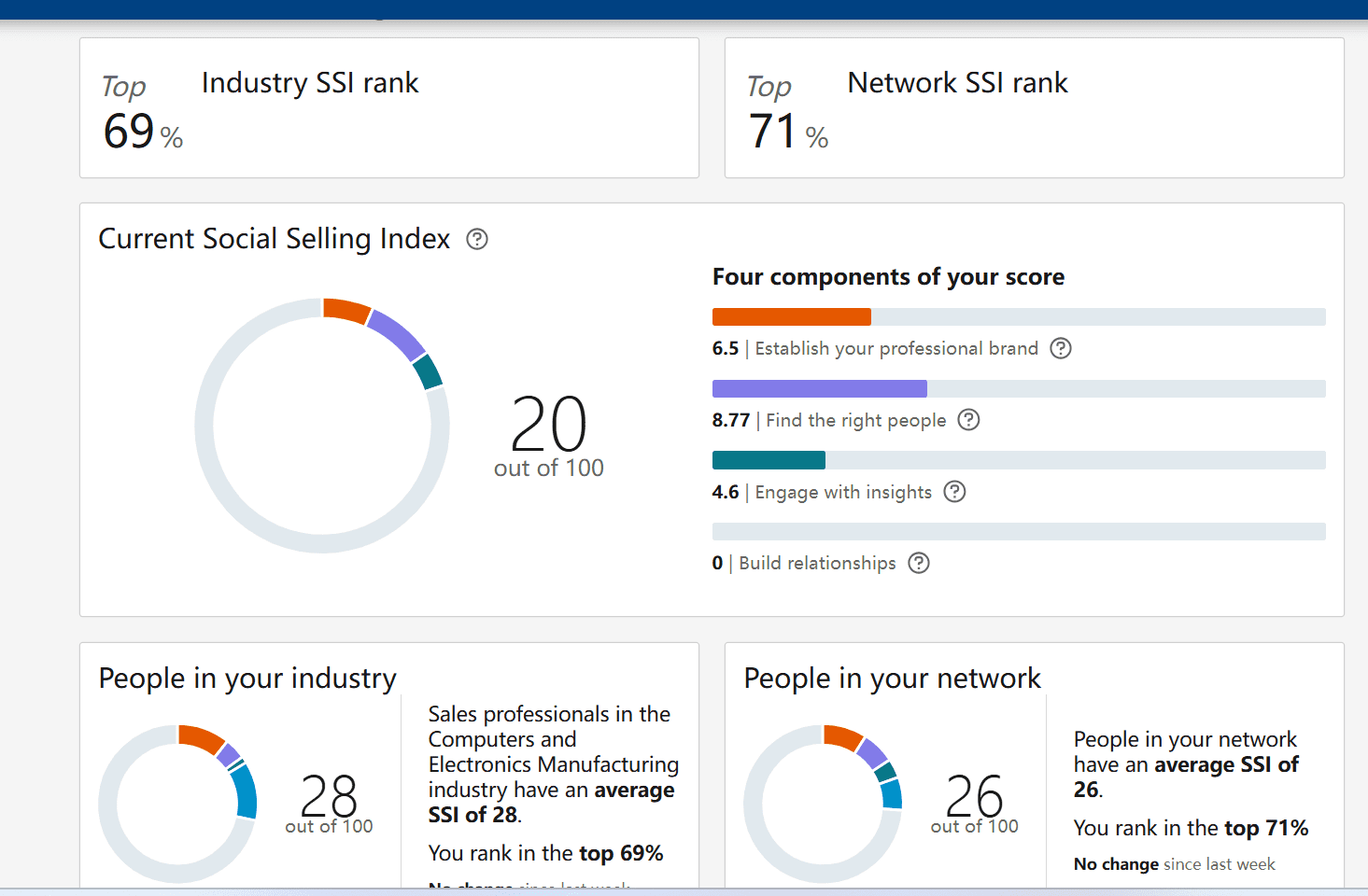
Verification note (September 2026): The official SSI page is live; the score is out of 100 and has four dimensions. LinkedIn does not publish a fixed relationship between SSI and invitation quotas, search access, distribution, or “account weight.” The low-score 5/week, high-score 200/week, and feature-unlock claims below are unverified and should not guide activity. LinkedIn SSI
Website: https://www.linkedin.com/sales/ssi
Today I want to share a practical feature every LinkedIn player should know — checking your account's “Social Selling Index (SSI).” This score directly affects how efficiently you develop clients, and if you don't plan to buy a membership, you should definitely pay attention!
1. Where to Check Your Score? Official Entry Point
Website: https://www.linkedin.com/sales/ssi
It's simple: log in with your LinkedIn account, and you'll immediately see your total score (out of 100) and detailed scores across four dimensions.
A real-world example:
- If your score is below 30, without a membership you can only send 5 connection requests per week — and even if you send more, the other party may never receive them.
- But if your score is high enough (say 70+), still without a membership, you can add up to 200 people per week! For anyone in B2B sales, headhunting or cross-border e-commerce, that gap is pretty clear, right?
2. Your Score Depends on These 4 Factors — See Which One Is Holding You Back
SSI isn't a random score. It mainly looks at these four dimensions (25 points each), which directly reflect your “effective actions” on LinkedIn:
- Professional brand: Is your profile photo clear? Is your headline professional enough? Have you planted industry keywords (like “digital marketing” or “cross-border e-commerce”)?
Tip: use a professional headshot, not a landscape photo; list specific skills in your work history instead of just job duties. - Finding the right people: How many of your connections are in your target industry? Have you been steadily adding quality connections recently?
Tip: proactively add 10-15 target clients each week, don't randomly add irrelevant people; check their profile first and send personalized invitations. - Engaging with insights: Is the content you post relevant to your industry? Are people liking, commenting and sharing it?
Tip: post 1-2 industry-related pieces per week, like case studies or trend analyses; also reshare good content and @ potential clients to discuss. - Building relationships: How fast do you reply to messages? Do you tag clients and keep complete follow-up records?
Tip: reply within 24 hours when possible, use LinkedIn's built-in CRM features to categorize clients — stop keeping notes in a notebook.
3. What's a High Score Actually Good For? These 3 Things Matter Most
- Double your client development efficiency: a high score means you can reach more people — especially without paying for a membership. Reaching 195 more people per week is nearly 800 per month, so naturally more opportunities.
- Your content gets seen more: your articles and updates get pushed to more target clients. Write an industry analysis and 5,000+ people might see it — several times the exposure of a low-score account.
- Save on membership fees: many basic features unlock for free with a high score, like batch messaging and precision search — no need to pay for a membership from day one.
4. 3 Steps to Raise Your Score Fast, Beginner-Friendly
Week 1: “Decorate” your profile
- Change your photo to a formal headshot — no sunglasses; use an industry-related banner (if you're in IT, use a tech-style background).
- Add 3-5 precise tags under “Skills,” like “Lead Generation” or “Social Media Marketing,” so people can find you.
Weeks 2-4: Add people with purpose
- Each day, search for 3-5 target clients (filter by “decision maker” or “same industry”); don't waste slots on interns and the like.
- Don't use the default invitation template — write something human, like: “I see you're doing great work in XX, I'd love to discuss industry trends with you. Would you be open to connecting?”
Long-term: use content as a “hook”
- Write at least 1 original post per week — it doesn't need to be long, around 300 words; share a case study or analyze some data, and add an image to make it more attractive.
- Browse industry leaders' posts when you have time, leave valuable comments, @ the clients you want to reach, and stay visible.
Two final reminders
- Don't add people indiscriminately: don't exceed 30 adds per day, and especially avoid those “one-click bulk add” tools — they easily get you rate-limited or even banned.
- Check your score once a month: log into the SSI page and see which dimension is low — if “content engagement” is low, do more Q&A-style content next month, or try a short video.
Simply put, LinkedIn isn't about “the more connections the better” — it's “the more precise actions, the higher the score.” Spend some time nailing these four dimensions, and even without spending money, you can get membership-level results from your account. Log into the SSI check page now and see your score!
Go check your account's score — the higher the score, the better your account.
For example: with a score under 30, without a membership you can only send 5 connection requests! (Even if you send more, the other party can't receive or see them.)
If your SSI (Social Selling Index) score is high enough, you can add up to 200 people per week without a membership.
As shown in the image, this account has a health score of 20.