 VirtualCardx
TranslatePress and Astra Pro Theme Compatibility Issues
TranslatePress does have compatibility issues with the Astra Pro theme. The known issues include the following:
Broken styles: The layout or typography of translated pages does not match the original language.
The menu shows an error like this:
<nav role="navigation" aria-label="Chapelure" class="breadcrumb-trail breadcrumbs" data-no-translation-aria-label="">
  <div class="ast-breadcrumbs">
    <ul class="trail-items">
      <li class="trail-item trail-begin">
        <a href="https://xxxxx.com/fr/" rel="home">
          <span data-no-translation="" data-trp-gettext="">Accueil</span></a>
      </li>
      <li class="trail-item trail-end">
        <span>
          <span>#!31jeu, 20 Mar 2025 05:39:21 +00002131#31jeu, 20 Mar 2025 05:39:21 +0000Z-5+00:003131+00:00202531 20am31am-31jeu, 20 Mar 2025 05:39:21 +00005+00:003131+00:002025312025jeu, 20 Mar 2025 05:39:21 +0000395393amjeudi=778#!31jeu, 20 Mar25 05:39:21 +0000Z+00:003#2025#!31jeu, 20 Mar25 05:39:21 +0000Z2131#/31jeu, 20 Mar25 05:39:21 +0000Z-5+00:003131+00:00202531#!31jeu, 20 Mar25 05:39:21 +0000Z+00:003#</span></span>
      </li>
    </ul>
  </div>
</nav>
</div>
</div>
In its original state it looks like:
<nav role="navigation" aria-label="Breadcrumbs" class="breadcrumb-trail breadcrumbs">
  <div class="ast-breadcrumbs">
    <ul class="trail-items">
      <li class="trail-item trail-begin">
        <a href="https://xxxxx.com/" rel="home">
          <span>Home</span></a>
      </li>
      <li class="trail-item trail-end">
        <span>
          <span>2025</span></span>
      </li>
    </ul>
  </div>
</nav>
</div>
</div>
How do you fix this problem?
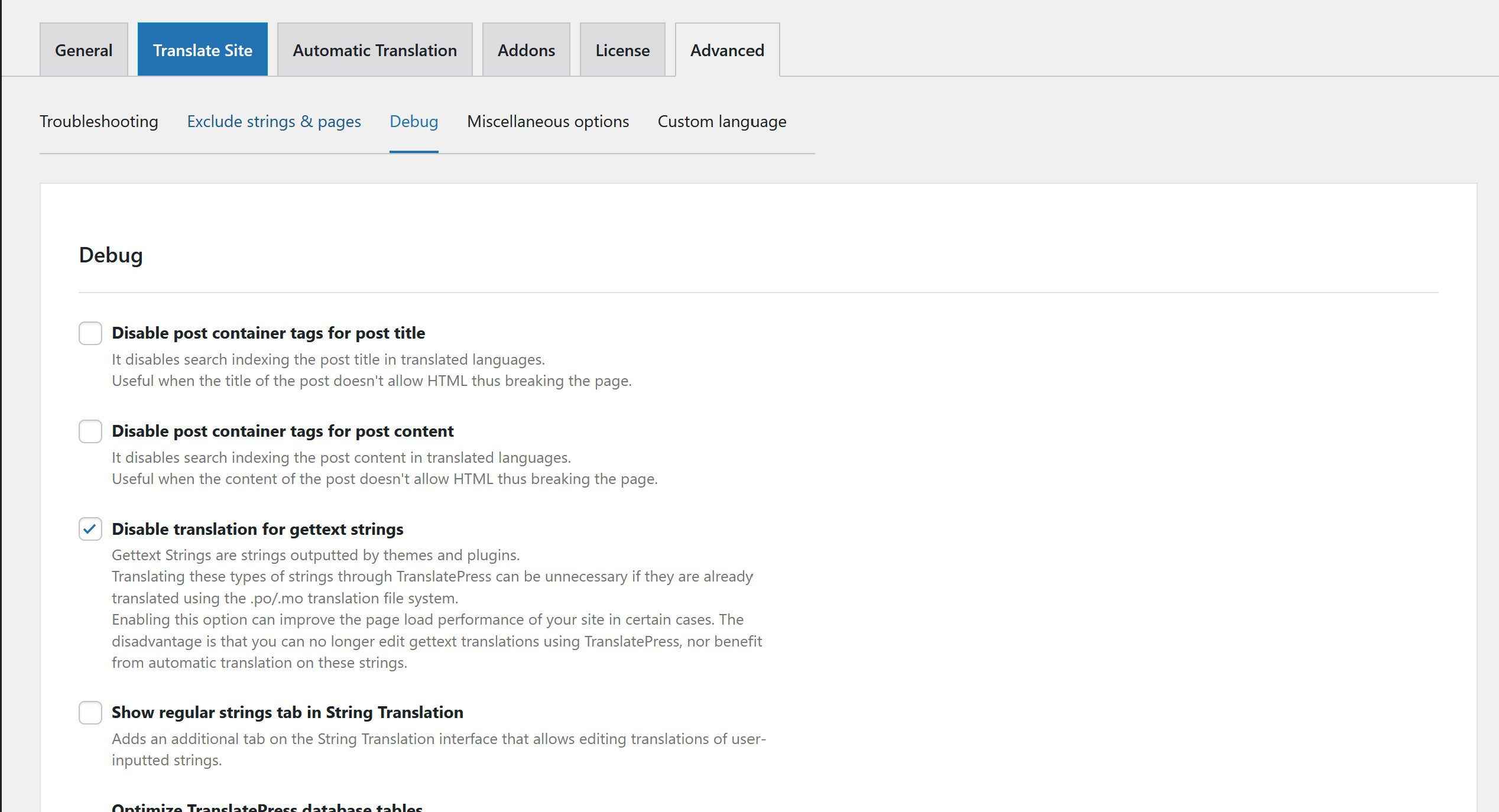
Open the TranslatePress admin settings page, switch to the Advanced tab, click the Debug tab, and check "Disable translation for gettext strings," as shown below:
TranslatePress and Astra Pro Theme Compatibility Issues: Additional Notes and Usage Tips
Content like this is worth bookmarking, but it also needs periodic review. Tools, platforms, links, and rules all change — especially free resources, temporary services, and third-party platforms, which often go offline, get redesigned, or restrict access by region.
Tips before using
- First confirm the link is still accessible.
- Prefer official documentation over second-hand tutorials.
- When accounts, emails, payments, or private data are involved, do not submit sensitive information.
- Keep alternative options saved too, to avoid a single point of failure.
If you are using it for long-term business purposes, choose tools with a stable maintenance record, a clear privacy policy, and a reachable support channel. Free solutions are fine for short-term needs, but do not keep critical data on uncertain platforms for long.
Related content
Update and review tips
We recommend reviewing this content periodically. Tool entry points, platform rules, browser menus, account risk controls, and terms of service can all change. When reviewing, focus on three things: whether the original method still works, whether a simpler new solution has appeared, and whether new risk warnings need to be added.
If you are doing this for the first time, test in a trial account or low-risk environment before moving to production. That way, even if the steps do not apply, your main account, main site, or business data will not be affected.
General troubleshooting order for technical issues
- First confirm the problem can be reproduced consistently — do not draw conclusions from a single anomaly.
- Record the current version, paths, account permissions, and the full error message.
- Change only one variable at a time and verify immediately, to avoid mixing multiple changes.
- If a production site is involved, back up first. This is especially true for WordPress, Nginx, certificate, and cache issues.
Many seemingly complex problems turn out to be caused by cache, permissions, paths, or version differences. Troubleshooting layer by layer is more reliable than repeatedly copying commands.
2026 verification note
Recheck this procedure against the linked primary documentation and the live configuration before applying it. Product limits, plugin settings, dashboard labels, server paths, and commands change over time. Take a backup, test in staging where possible, validate configuration syntax before reload/restart, and verify the resulting HTTP status, canonical URL, logs, and user-visible behavior. Do not treat a successful command or a third-party tool score as proof that the underlying SEO, security, or availability issue is resolved.
Use least-privilege credentials, keep secrets out of repositories and logs, and preserve a rollback plan. For search changes, observe Search Console data over a normal reporting period rather than repeatedly requesting indexing.