 VirtualCardx
Hermes Agent Backup Tutorial: Rclone + R2 + Cron
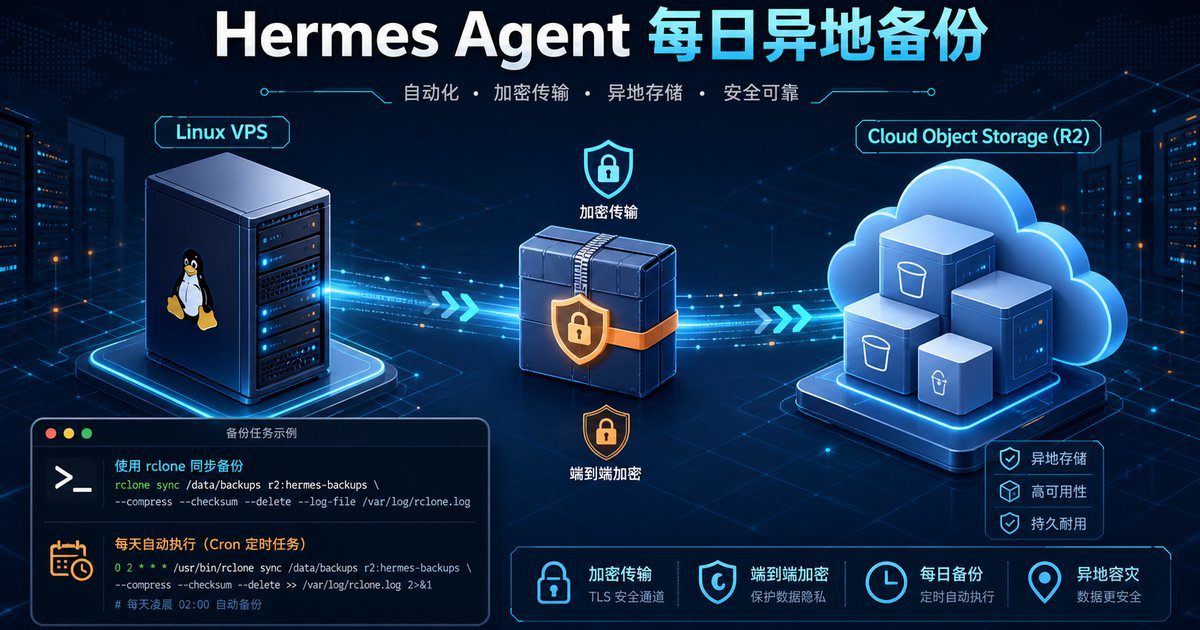
Most of Hermes Agent's configurations, sessions, memory, skills, and credentials are stored in ~/.hermes. Once a VPS is blocked, accidentally deleted, or suffers disk corruption, reinstalling the software isn’t difficult; the real hassle is restoring all the settings and configurations that have been accumulated over time.
The following solution uses Rclone to ~/.hermes Package, encrypt, and upload the data to Cloudflare R2, then have the Linux system’s Cron run the task daily. This approach does not rely on Hermes’s own scheduled tasks: even if the Hermes Agent temporarily fails, the system’s Cron will continue to run the backups.
First, a couple of corrections:Do not hardcode encryption passwords directly into scripts, and do not use pkill -f "hermes start" Forcefully terminate the process. The former will leak passwords, while the latter may kill the wrong process, and the original solution did not reliably restart Hermes.
I. Setting Up Cloudflare R2
Log in to the Cloudflare console, open R2 Object Storage, and complete the following three steps:
- Make a note of your Cloudflare Account ID.
- Create a private bucket, for example
hermes-backup-bucketThe - Create a token in “Manage R2 API Tokens” to grant permissions to read, write, and delete objects in the target bucket.
Be sure to keep the generated Access Key ID and Secret Access Key safe. The Secret will only be displayed in full once; do not post it in chat windows or include it in public repositories.
II. Install and Configure Rclone
The official installation script is compatible with common Linux distributions such as Debian and Ubuntu:
curl -fsSL https://rclone.org/install.sh | sudo bash
rclone version
If you don't want to run a web script, you can also install it using the system package manager, but the version in the repository may be outdated.
Launch Interactive Configuration:
rclone configEnter the values shown below. Menu numbers may vary across different versions of Rclone, so you should refer to the option names rather than memorizing the numbers.
- Select
nCreate a new remote and enter a namecf_r2The - Storage Type Selection
s3The - Provider Selection
CloudflareThe - Enter the Access Key ID and Secret Access Key.
- Endpoint Entry
https://<ACCOUNT_ID>.r2.cloudflarestorage.com, replace the placeholder with the actual Account ID. - Region: Keep
autoOr leave blank; ACL remains unchangedprivateThe - Save the configuration and enter
qExit.
Test Connection:
rclone lsd cf_r2:
rclone lsf cf_r2:hermes-backup-bucket
If the first command lists the buckets and the second command returns no errors, that means authentication and bucket permissions are working properly.
III. Store the Encryption Password Separately
Create a password file that only the current user can read. The sample string below must be replaced; we recommend using a password manager to generate a random password of at least 24 characters.
mkdir -p "$HOME/.config/hermes-backup"
umask 077
printf '%s\n' 'Please replace this with your own long random password' \
  > "$HOME/.config/hermes-backup/passphrase"
chmod 600 "$HOME/.config/hermes-backup/passphrase"
This password file cannot be placed in ~/.hermesOtherwise, you’ll get stuck in an endless loop during restoration where you “can’t open a backup that contains a password without that password.” Please save a copy of the password to a local password manager or offline storage medium.
IV. Creating a Backup Script for the Secure Edition
It is recommended that you place the script in the current user's directory rather than writing it directly to /opt. This way, regular backup tasks do not need to have root privileges.
mkdir -p "$HOME/bin"
nano "$HOME/bin/hermes-r2-backup.sh"
Paste the following complete script:
#!/usr/bin/env bash
set -Eeuo pipefail
umask 077

PATH="$HOME/.local/bin:/usr/local/bin:/usr/bin:/bin"
REMOTE_NAME="cf_r2"
BUCKET_PATH="hermes-backup-bucket/hermes-agent"
RETENTION_DAYS=30
HERMES_DIR="${HERMES_HOME:-$HOME/.hermes}"
PASSWORD_FILE="$HOME/.config/hermes-backup/passphrase"
LOCK_FILE="${TMPDIR:-/tmp}/hermes-r2-backup.lock"

command -v rclone >/dev/null || { echo "rclone is not installed"; exit 1; }
command -v openssl >/dev/null || { echo "openssl is not installed"; exit 1; }
[[ -d "$HERMES_DIR" ]] || { echo "Directory does not exist: $HERMES_DIR"; exit 1; }
[[ -s "$PASSWORD_FILE" ]] || { echo "Password file does not exist: $PASSWORD_FILE"; exit 1; }

exec 9>"$LOCK_FILE"
flock -n 9 || { echo "A backup job is already running; exiting"; exit 0; }

DATE_TAG="$(date -u +%Y%m%d_%H%M%S)"
TMP_DIR="$(mktemp -d "${TMPDIR:-/tmp}/hermes-backup.XXXXXX")"
BACKUP_FILE="$TMP_DIR/hermes_${DATE_TAG}.tar.gz.enc"
REMOTE_DIR="${REMOTE_NAME}:${BUCKET_PATH}"
GATEWAY_WAS_ACTIVE=0

cleanup() {
  rc=$?
  rm -rf -- "$TMP_DIR"
  if [[ "$GATEWAY_WAS_ACTIVE" -eq 1 ]]; then
    hermes gateway start >/dev/null 2>&1 || true
  fi
  exit "$rc"
}
trap cleanup EXIT INT TERM

# When the official gateway service is running, stop it normally first to avoid overwriting the SQLite database while it is being written to.
if command -v systemctl >/dev/null \
  && systemctl --user is-active --quiet hermes-gateway.service; then
  GATEWAY_WAS_ACTIVE=1
  hermes gateway stop
fi

# -C is very important: The archive contains only the .hermes/... directory, ensuring that the home/user directory is not included during restoration.
tar -C "$(dirname "$HERMES_DIR")" -czf - "$(basename "$HERMES_DIR")" \
  | openssl enc -aes-256-cbc -salt -pbkdf2 -iter 200000 \
 -pass "file:$PASSWORD_FILE" -out "$BACKUP_FILE"

# Explicitly specify the remote filename to avoid path ambiguity.
rclone copyto "$BACKUP_FILE" "$REMOTE_DIR/$(basename "$BACKUP_FILE")" \
  --s3-no-check-bucket

# Read back from the remote object; if the operation fails, the script returns a non-zero value and does not treat an “upload failure” as a success.
rclone lsf "$REMOTE_DIR" --files-only | grep -Fx "$(basename "$BACKUP_FILE")" >/dev/null

# Delete old files that have exceeded the retention period and clean up empty directories.
rclone delete "$REMOTE_DIR" --min-age "${RETENTION_DAYS}d"
rclone rmdirs "$REMOTE_DIR" --leave-root

printf 'Backup %s finished: %s\n' "$DATE_TAG" "$(basename "$BACKUP_FILE")"
After saving, grant execute permissions:
chmod 700 "$HOME/bin/hermes-r2-backup.sh"First, run it manually once:
"$HOME/bin/hermes-r2-backup.sh"
rclone lsl cf_r2:hermes-backup-bucket/hermes-agent
Seeing that hermes_year_month_day_time.tar.gz.enc Only when an object is named is the initial validation complete.
V. Setting Up a Daily Cron Job
Edit the crontab of the current Hermes user; do not use the root crontab, otherwise $HOMEBoth the Rclone configuration and the Hermes directory point to the wrong user.
crontab -eRuns every day at 2:00 a.m.:
0 2 * * * "$HOME/bin/hermes-r2-backup.sh" >> "$HOME/.hermes/hermes_backup.log" 2>&1Run once every 12 hours:
0 */12 * * * "$HOME/bin/hermes-r2-backup.sh" >> "$HOME/.hermes/hermes_backup.log" 2>&1Check Tasks and Logs:
crontab -l
tail -n 100 "$HOME/.hermes/hermes_backup.log"
This uses the Linux Cron system, not Hermes Cron. Backup is part of the disaster recovery infrastructure and should be as independent as possible from the applications being backed up.
VI. Full Recovery on a New VPS
On the new machine, first install Hermes Agent, Rclone, and OpenSSL, then reconfigure the file with the same name. cf_r2 remote. Do not run it directly. Hermès Setup Overwrite the old configuration.
curl -fsSL https://hermes-agent.nousresearch.com/install.sh | bash
curl -fsSL https://rclone.org/install.sh | sudo bash
rclone config
Create a password file and enter the same password used during the backup:
mkdir -p "$HOME/.config/hermes-backup"
umask 077
printf '%s\n' 'your original encryption password' \
  > "$HOME/.config/hermes-backup/passphrase"
chmod 600 "$HOME/.config/hermes-backup/passphrase"
Automatically find and download the backup with the most recent timestamp:
REMOTE_DIR="cf_r2:hermes-backup-bucket/hermes-agent"
LATEST="$(rclone lsf "$REMOTE_DIR" --files-only | sort | tail -n 1)"
[[ -n "$LATEST" ]] || { echo "没有找到备份"; exit 1; }
rclone copyto "$REMOTE_DIR/$LATEST" "$HOME/$LATEST"
Extract to a temporary directory and check the structure:
RESTORE_DIR="$(mktemp -d)"
openssl enc -d -aes-256-cbc -pbkdf2 -iter 200000 \
  -pass "file:$HOME/.config/hermes-backup/passphrase" \
  -in "$HOME/$LATEST" -out "$RESTORE_DIR/hermes.tar.gz"

tar -xzf "$RESTORE_DIR/hermes.tar.gz" -C "$RESTORE_DIR"
test -f "$RESTORE_DIR/.hermes/config.yaml"
ls -la "$RESTORE_DIR/.hermes"
Verify that the directory is correct before replacing it. Keep the current directory for now so you can roll back if an error occurs:
hermes gateway stop || true
[[ -d "$HOME/.hermes" ]] \
  && mv "$HOME/.hermes" "$HOME/.hermes.before-restore-$(date +%s)"
mv "$RESTORE_DIR/.hermes" "$HOME/.hermes"
chmod -R go-rwx "$HOME/.hermes"

hermes doctor
hermes gateway start
hermes gateway status
After restoration, check whether the model credentials, Telegram/Discord channels, Cron jobs, and skills are functioning properly. The system crontab and Rclone configuration are not present. ~/.hermes ...so you'll still need to reconfigure it on the new device.
VII. Four Tests That Must Be Performed Before Launch
- Upload Test:Run the script manually and verify that the object size is not 0 in R2.
- Decryption Test:Download a backup, decrypt it in a temporary directory, and verify that you can view it.
.hermes/config.yamlThe - Cron Test:Temporarily rescheduled the task to run in a few minutes to verify that rclone and Hermes can be found even in a non-interactive environment.
- Recovery Drill:At least perform a full restore on another test machine once. Backups that haven’t been tested through a restore drill can only be considered “potentially useful.”
You can also configure lifecycle rules on the R2 end as a secondary retention strategy. Regardless of whether cloud-based automatic cleanup is enabled, we recommend downloading a copy to your local hard drive every month. R2 addresses single points of failure in VPS, while the local copy protects against issues with your account, tokens, or cloud storage itself.
bibliography
- Rclone: Cloudflare R2 Configuration Documentation
- Cloudflare R2 Official Documentation
- Hermes Agent CLI Command Reference
- Hermes Agent Gateway Documentation
2026 verification note
Recheck this procedure against the linked primary documentation and the live configuration before applying it. Product limits, plugin settings, dashboard labels, server paths, and commands change over time. Take a backup, test in staging where possible, validate configuration syntax before reload/restart, and verify the resulting HTTP status, canonical URL, logs, and user-visible behavior. Do not treat a successful command or a third-party tool score as proof that the underlying SEO, security, or availability issue is resolved.
Use least-privilege credentials, keep secrets out of repositories and logs, and preserve a rollback plan. For search changes, observe Search Console data over a normal reporting period rather than repeatedly requesting indexing.